![Zones_logo_dark_TM@2x.png]](https://l.myzone.org/hs-fs/hubfs/Evolution%20Branding/Zones_logo_dark_TM@2x.png?height=28&name=Zones_logo_dark_TM@2x.png)
Target zones are configured in the Owner's portal, then enabled in the Myzone software.
Step 1: Configuring your Target zone
Where to find it
Facility Settings > Facility > Console > Target Zones.
Target zone configuration uses a visual colour selector, with a preview and validation before you save, so you can confirm your zones look correct before they go live.
How do I set a new target zone?
In https://manage.myzone.org Navigate to Facility settings > Console >Target Zones.
The right hand side panel will open, allowing you to choose your heart rate range (either using the sliding scale or manually entering your minimum and maximum heart rates), and colour you want to assign to this target zone.
Note: the number you select is the % of maximum heart rate, rather than the heart rate number itself.
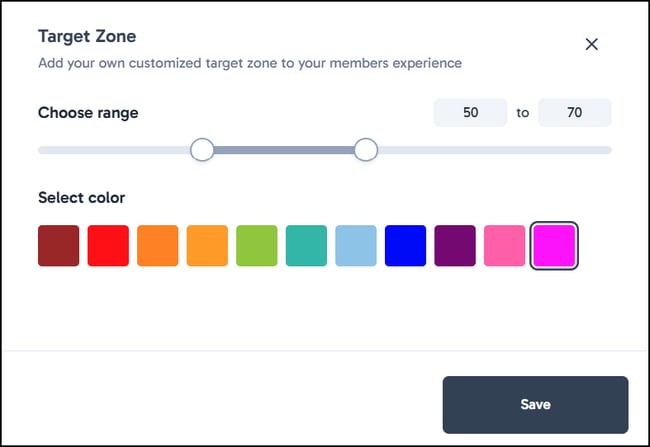
Your target zone does not replace the Myzone colour zones, rather, it identifies a specific zone you have created for your clients to reach during their exercise.
At the conclusion of the workout, members will receive their workout summary email indicating how much time they spent in your custom target zone.
Step 2: Enable Target Zone
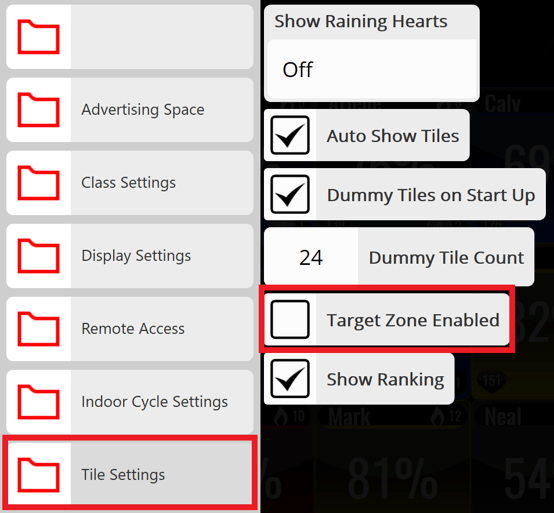
On the software, tap anywhere on the screen to access your main menu. Click on Unlock admin, type in the password (owner, if unchanged from the default) and then tap on Settings.
Once in settings, go to Tile Settings, then tick on Target Zone Enabled.
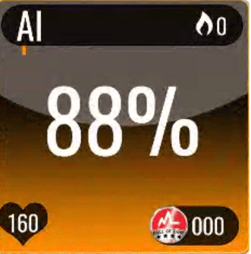
When a member's effort percentage is the target zone range this will cause the tile to change to the specified colour.