![Zones_logo_dark_TM@2x.png]](https://l.myzone.org/hs-fs/hubfs/Evolution%20Branding/Zones_logo_dark_TM@2x.png?height=28&name=Zones_logo_dark_TM@2x.png)
What changed
The legacy Facility Profile page has been redesigned as the Facility Settings page— one destination for facility-level setup, organized by task. The functionality itself hasn't changed. Everything you could do before, you can still do — it's just organized differently, with previews before you save, validation, and clear confirmation messages.
Where to find it
Go to Facility Settings in the left-hand navigation. You'll see four task groups each with related sub-tasks:
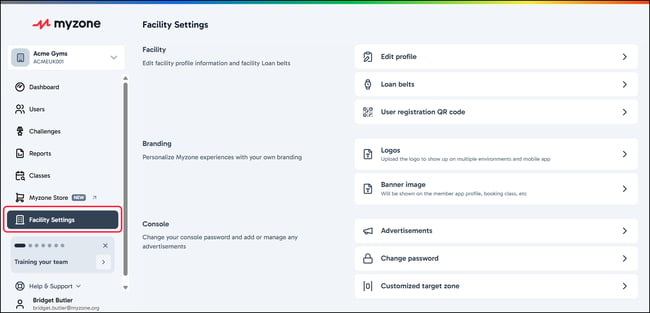
- Facility — profile details, loan device management, target zone configuration, and your facility QR code
- Branding — branding assets with previews for each destination before you save
- Console — console advertisements and console password
- Communications — email template configuration and the Max HR change notification preference
Has my data carried over?
Yes. All of your existing branding, target zone, and loan device data has been carried over automatically. There is nothing for you to re-enter.