![Zones_logo_dark_TM@2x.png]](https://l.myzone.org/hs-fs/hubfs/Evolution%20Branding/Zones_logo_dark_TM@2x.png?height=28&name=Zones_logo_dark_TM@2x.png)
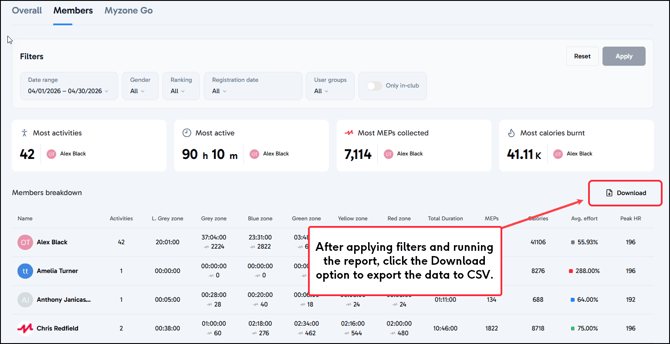
To view any of the available reports on individual members, you will first need to apply the appropriate filters.
You can segment the data by;
Date range
Gender
Myzone Status
Member Registration Date (available via the additional filters option)
User Groups (available via the additional filters option)
In-club only (available via the additional filters option)
To apply any of the additional filter options, click the Edit filter icon.
Your selected filter will not automatically apply, you must make sure to click the Apply or Confirm button for the individual filter, then the overall Apply button to see your results.
Downloading Reports
Reports in the Member section can be downloaded in CSV format. Once you have applied your filters and gathered the data you need, click the Download button in the top right corner above your listed data.