![Zones_logo_dark_TM@2x.png]](https://l.myzone.org/hs-fs/hubfs/Evolution%20Branding/Zones_logo_dark_TM@2x.png?height=28&name=Zones_logo_dark_TM@2x.png)
Where to find it
Organization view > Reports (visible to multi-facility organizations).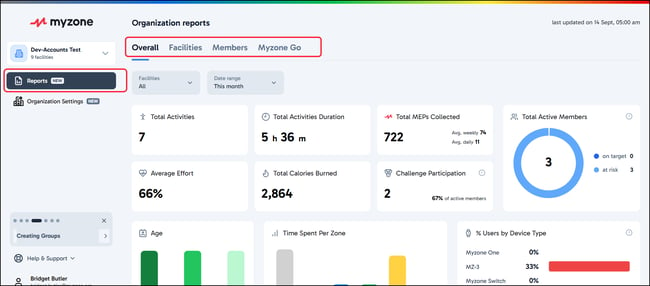
What you can do
- View aggregate performance across every facility in the selected organization.
- Filter and compare facilities to identify strong-performing and underperforming locations.
- All the same reports are available for individual facilities, navigating to the individual Facility page, then selecting Reports from the left hand side menu.
- For a full breakdown of what reports you can run, check out the main reports help pages
What Organization Level Reports can I run?
You have 4 tabs of reports to explore;
-Overall
-Facilities
-Members
-Myzone Go
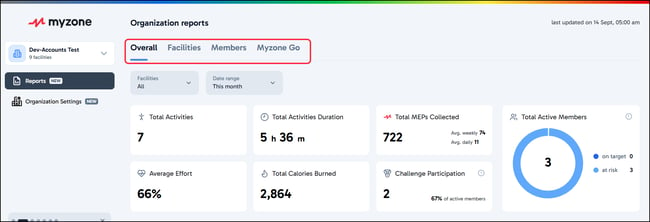
On each tab you have the option to filter the data to show particular Facilities within your organization, by default they will always show the full organization structure.
Use the Facilities drop-down to show only data for certain facilities;
Do I see individual member data too?
That depends on your role at each facility. Facility comparison covers every facility linked under your organization. Individual member data is shown only for facilities where you personally hold the Owner role. If you oversee locations you don't own, you'll see how they're performing without seeing their members.
I run a franchise brand and my franchisees pay Myzone directly. What do I get?
Facility comparison across the facilities linked under your organization. Because your franchisees hold and pay for their own subscriptions, organization-level billing doesn't apply to you. Member-level reporting appears only for any facility where you personally hold the Owner role.