![Zones_logo_dark_TM@2x.png]](https://l.myzone.org/hs-fs/hubfs/Evolution%20Branding/Zones_logo_dark_TM@2x.png?height=28&name=Zones_logo_dark_TM@2x.png)
Where to find it
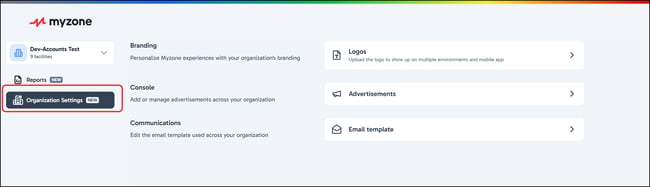
Organization view > Organization Settings (visible to multi-facility organizations).
What it does
Organization Settings applies to Branding, Console, and Communications changes across every facility in the selected organization in one action.
Note: The actions you can take here are the same as your find in Facility Settings, with the difference being that it allows you to make the changes across ALL your Facilities in one action.
If I change a setting here, does it affect all my facilities?
Yes. Changes apply across your entire selected organization. The portal makes this scope clear before you save.
Related articles: Organization Mode overview, Facility Settings hub: what moved and where