![Zones_logo_dark_TM@2x.png]](https://l.myzone.org/hs-fs/hubfs/Evolution%20Branding/Zones_logo_dark_TM@2x.png?height=28&name=Zones_logo_dark_TM@2x.png)
You have the option to add advertisements for additional in-club marketing that rotate on your Myzone systems in your facility. Once you have uploaded advertisements within the Facility Settings page these will automatically sync to your software within 30 minutes. If you require these to show immediately, you will need to do a manual update of software.
If you need to turn advertisements on or off in the software check out this guide; How to Add Advertisements to Your Software.
Where to find it
Facility Settings > Console > Advertisements.
Add a new Advertisement
Navigate to Facility Settings > Console > Advertisements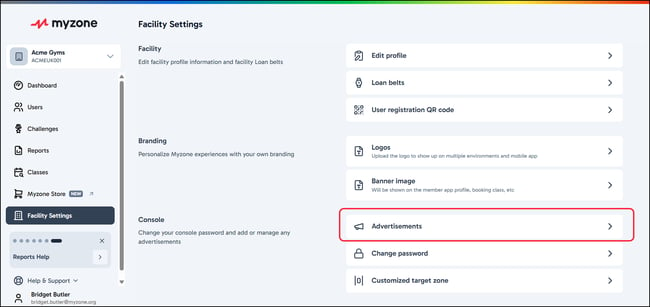
The right hand side window will open, listing out all the current advertisements you have uploaded to your console.
To add a new one, click Add more.
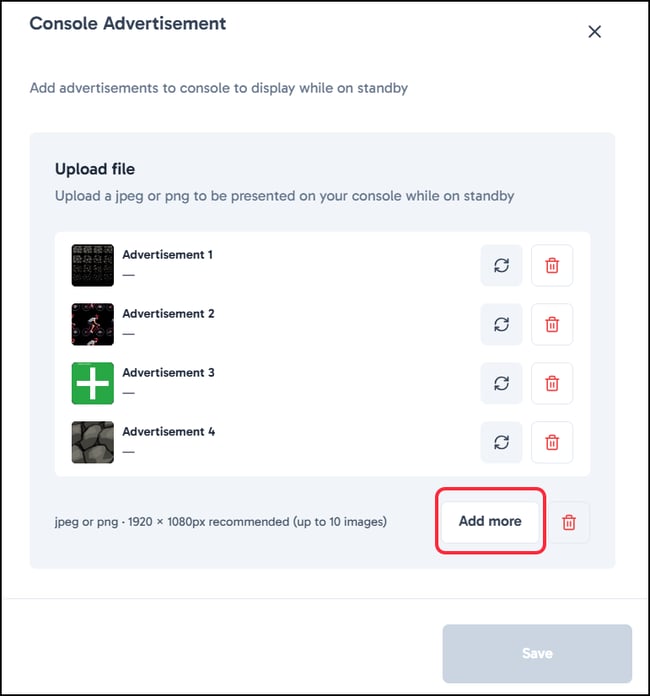
Make sure to click Save once your advert has uploaded.
If you want to remove any adverts, simply click the bin icon against the relevant advert. You will be asked to confirm your action.
How many advertisements can I have uploaded?
You can have a maximum of 10 advertisements uploaded. If you want to update an advertisement you already have in a particular slot, you can use the refresh icon against that entry to choose a different file to upload. 
How do I get my adverts to sync and show on the software straight away?
1. Exit the Software on your system:
Click anywhere on the screen to bring up the menu.
Click Unlock Admin and enter your password.
Click Exit Myzone.
2. Run a Manual Update from Myzone Update Manager:
On your desktop, locate the file Myzone Update Manager.
Click File then Update.
You will see the software update and see "–UPDATE COMPLETE –"
You can now click back into File and click Launch Myzone
Your new advertisements will then display on the screen.